Things Prepared Before Starting Development
Now that the planning and design were finished, it was time to actually build it. However, for someone who doesn't know coding to build an app, there are things to prepare before the code itself. Where to deploy it, which APIs to use, and where to store the code. If you don't decide these three things first, you won't even know what to ask Claude to build. I organized them one by one in order.
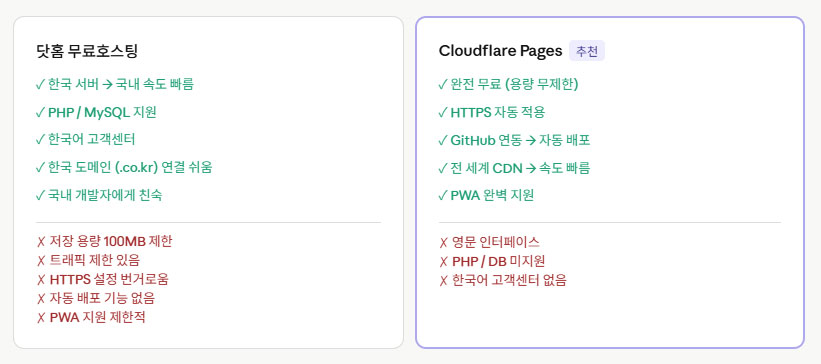
DotHome vs. Cloudflare — Where to Post It
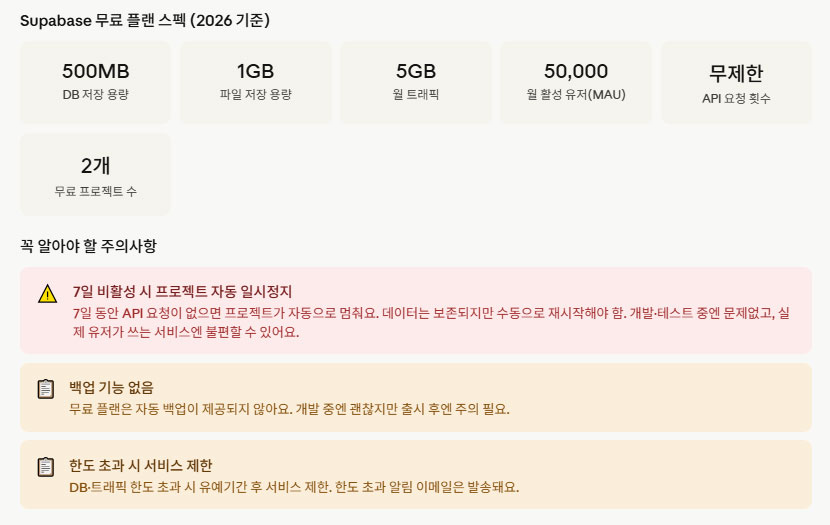
Once you create a web app, you have to upload it to the internet. At first, since my existing corerealhub.com blog was already hosted on DotHome, I considered just using DotHome as is. However, after doing some research, I found an option called Cloudflare Pages. After comparing the two, Cloudflare was more suitable for a web app like *k-Naengteol*. There were differences in terms of speed, free traffic, and ease of deployment. Also, since it seemed like a database would be necessary, I checked the usage details of Superbase as well.


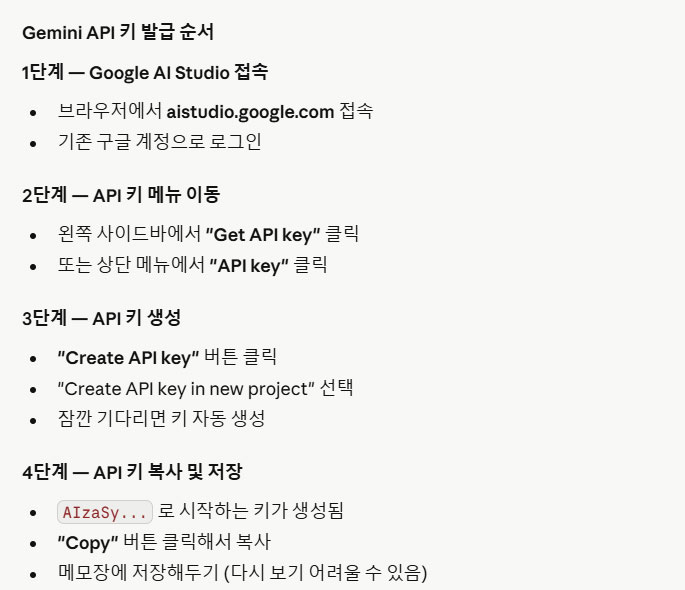
Gemini API Issuance Order
The core functions of k-Cold Food, such as ingredient recognition and recipe recommendations, are handled by the Gemini API. To use the API, you must first obtain one. The process of creating an account and obtaining an API key in Google AI Studio was simpler than expected. I have summarized the issuance order in the image below.

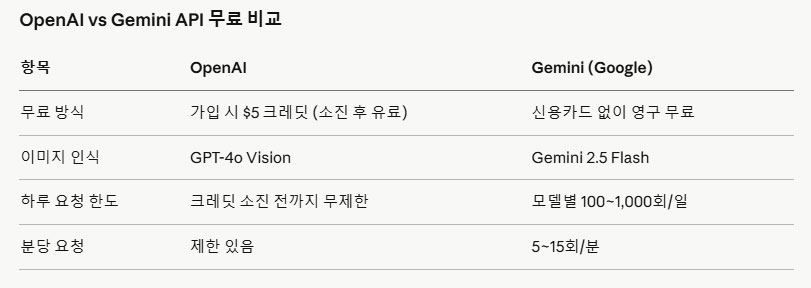
Gemini API Usage Fees
Using the API incurs fees. I was initially worried about this. However, the free usage allowance for the Gemini API is quite generous. For a personal app, the free tier is sufficient for operation. However, since charges apply as the number of users increases, it is advisable to familiarize yourself with the structure in advance. You can refer to the image below for the actual pricing table.

Creating a GitHub Repository
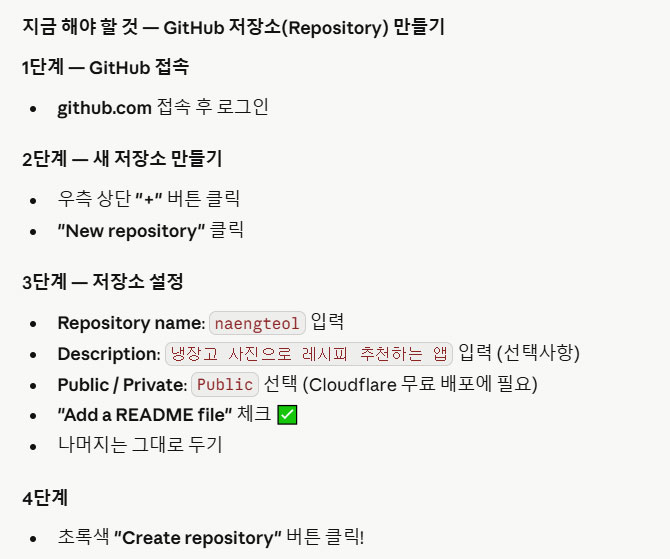
You need a space to store code and manage versions. GitHub fulfills that role. Even if you don't know how to code, you must use GitHub. This is because if you don't save the code Claude created for you, you will have to start over from scratch every time you make a modification. The steps for creating a repository are not difficult. I have summarized them in the image below.

I Decided the Development Order First
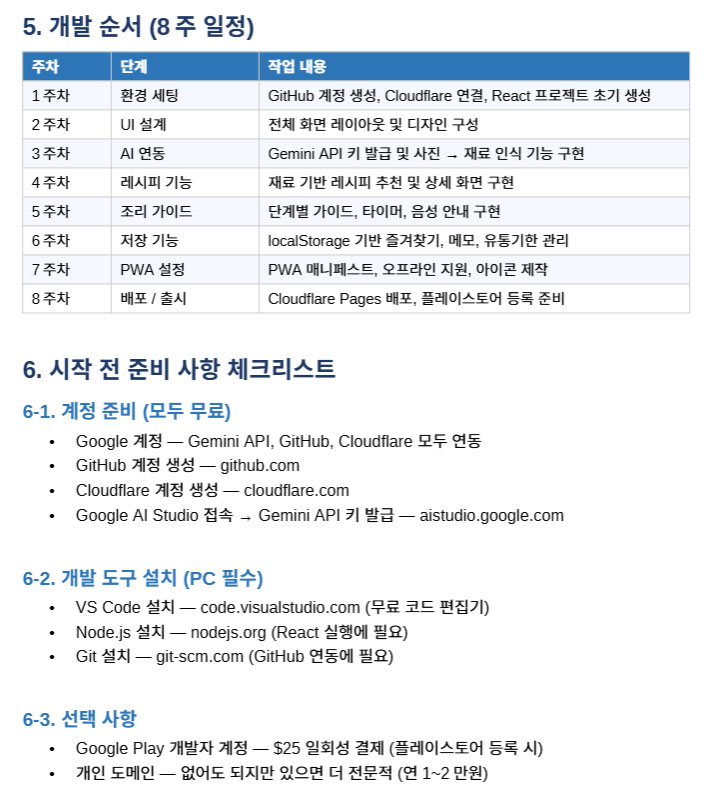
I didn't just start building blindly after preparations were complete. Before requesting the first code from Claude, I organized the overall development order first. If you start without a sequence, the structure is likely to get tangled when adding features later. The table below shows the order in which the development of k-Naeng-Teol was carried out. Although there were parts that did not actually proceed in this order, the overall flow did not deviate from this plan.

Starting a Web App with Claude
Once preparations were complete, I finally asked Claude my first question. "I plan to build a refrigerator ingredient recognition and recipe recommendation app using React and Vite. Please create an initial project structure that can be uploaded to a GitHub repository." After entering the question and waiting a moment, a file structure and code poured out. For someone who had never coded before, that moment was quite shocking. All I had done was ask a single line of text, yet code filling the entire screen appeared.
The important thing was how to ask the question. At first, I often vaguely said, "Make me an app," but the desired result did not come out. As I gradually gained experience, I began to explain in detail the technology stack, desired features, and even the direction of the file structure. The more specific the question, the more accurate code Claude generated. I learned early in development that you shouldn't ask careless questions just because you don't know how to code.
When I pasted that code into GitHub and connected it to Cloudflare Pages, a real address appeared. I still remember the moment the screen popped up when I entered that address into the browser. It was a bare and crude screen, but the app I had created was uploaded to the internet. It was the moment when something that had existed only on the planning document became reality. The planning and design process was covered in detail in Part 3.
From the moment the first screen appeared, the work of adding features one by one began. I proceeded in the order of creating buttons, input fields, and connecting to the Gemini API. At every step, when I explained to Claude, "Please add this feature," or "This part isn't working," he would provide the modified code. As I repeated this process, the app gradually took shape.
The Reality of Claude's Usage Limit
However, an unexpected obstacle arose during development: Claude's usage limit. I had subscribed to the cheapest paid plan, but the limit would fill up quickly while working on complex code. If the "You have reached your usage limit" message popped up at a critical moment, I had to wait a few hours, or sometimes as long as a day, before starting over.
When restarting, I had to explain my previous work to Claude again. The process of communicating from scratch what I had built, the structure I had set up, and what the problems were was repeated. One of the reasons the development period was extended to three months was precisely this battle with the usage limit. Anyone considering building an app with AI should be aware of this before they begin. You can find AI tools available for development in this article.
After creating the first version
From the preparation process to the first screen appearing, it was a stage where we confirmed that it is actually possible for someone who doesn't know coding to build an app with AI. Of course, the first version was closer to a shell. There was no ingredient recognition or recipe recommendation yet. It was a screen where nothing happened even when a button was pressed. However, it was because that screen existed that we were able to move on to the next stage.
In the next installment, we will cover the process of actually implementing the core features: ingredient recognition and AI recipe recommendation. We plan to candidly capture the experience of the app starting to function like a real app for the first time the moment it connects to the Gemini API.